The Vision DMX data stream is defined as the following:
| data[0] | data[1] | data[2] | data[2] | … | data[512] |
|---|---|---|---|---|---|
| VisionReceptionMode | dmx[1] | dmx[2] | dmx[3] | … | dmx[512] |
VisionReceptionMode= 0 -> DMX (DMX Control Mode – Via DMX Gateway, Use fixture settings)
When VisionReceptionMode is set to 0, the fixture shall behave like it is controlled by a normal DMX stream.
The fixture shall use the currently selected fixture settings, including for example:
- DMX mode
- DMX start address
- fixture configuration
- color mixing settings
- other user-selected fixture settings
In this mode, the behavior shall be identical to normal DMX operation.
VisionReceptionMode == 255 (APP Control Mode, Use app optimized default settings)
the fixture shall use a defined app-control state according to the Vision DMX Personality Requirement.
In this mode, the fixture shall ignore user-selected fixture settings for the Vision DMX data stream and instead use fixed, app-optimized default values.
This includes, for example:
- All fixtures of the same type shall behave consistently during app control
- DMX start address shall be
1 - DMX mode shall match the required Vision DMX personality
- color mixing behavior shall be fixed and predictable
- the fixture shall not switch between RGB, RGBW, RGBL, or similar modes based on fixture settings
This is important because fixtures must not behave differently when controlled through the Vision app.
The fixture shall not modify any internal user settings, display settings, saved DMX settings, or settings used by other protocols.
The app-control defaults are only applied internally for the Vision DMX data stream.
RDM shall still report the user-selected fixture settings, not the temporary app-control defaults.
This function is used that the app can control the fixture in a defined state without manipulating the settings of the fixture.
Example using the Vision/iQMesh Library
- Data[0]: Vision DMX Personality
- Data[1-512]: DMX (DMX Data[0..511])
In the example this is already separated:
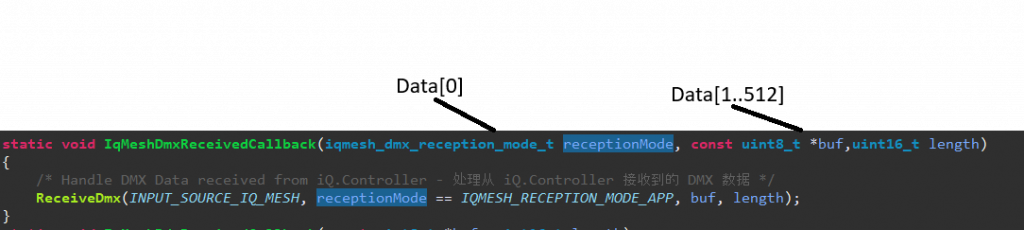
Example Fixture Implementation:
Personalities of your fixture:
- 1: Simple (Length 5)
- 2: Advanced (Length 10)
- 3: Single Pixel Control (Length 50)
- App Control Personality: (Not exposed in RDM) -> Single Pixel Control (Length 50)
App Control Settings:
Default App Control Settings: Dimmer Curve Linear, Dimmer Speed fast (snap)
Current Example
Selected DMX Address: 10
Selected DMX Personality: 2
Selected Dimmer Curve: Quadratic , Selected Dimmer Speed slow
Behavior:
- VisionReceptionMode = 0
- DMX Data[9] DMX Personality[2]
- Dimmer Curve Quadratic, Dimmer Speed slow
- VisionReceptionMode = 255 -> ignores settings use app control default
- DMX Data[0] DMX Personality[3]
- Dimmer Curve Linear, Dimmer Speed fast (snap)