Handle RDM
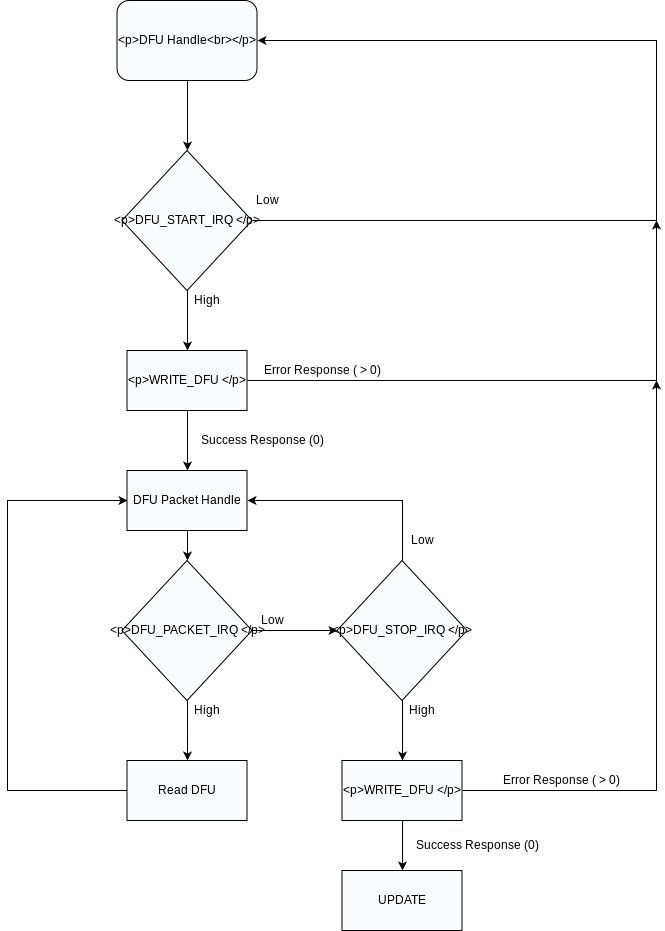
Receiving and transmitting RDM is done through “READ_RDM“ and “WRITE_RDM“. The fixture must always react to the RDM commands. Even if iQ.Mesh is not the selected input source.
Use the “RX_RDM_IRQ” flag to detect new RDM frames.
Handle DMX
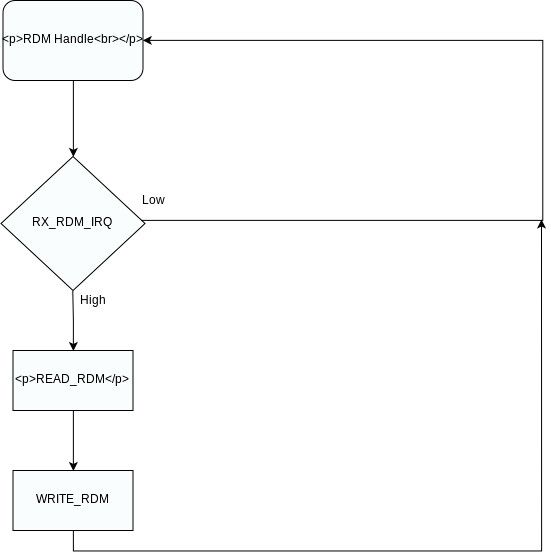
Receiving and transmitting DMX is done through “READ_DMX“ and “WRITE_DMX“. Whenever “Vision Protocol“ is selected as input source you must read DMX Frames and react to them.
Use the “RX_DMX_IRQ” flag to detect new DMX frames. Maximum resfresh rate is 20ms.
READ_DMX
This function must be used to derive input values for Vision as selected input source. The data stream is defined as the following:
| data[0] | data[1] | data[2] | data[2] | … | data[512] |
|---|---|---|---|---|---|
| Vision DmxPersonality | dmx[1] | dmx[2] | dmx[3] | … | dmx[512] |
First value is called Vision DmxPersonality. Dependening on its value different dmx personalities must be chosen. Caution: Do not change internal settings of the fixture like DmxPersonality for HMI, RDM etc.
VisionDmxPersonality== 0
If this value is 0 then use the settings like dmx mode, dmx startaddress, fixture settings, .. from the settings selected in the fixture. The same as the normal dmx behavior.
VisionDmxPersonality> 0 && VisionDmxPersonality< 255
If iQ.DmxPersonality value is higher than 0 and smaller than 255 use the dmx personality with the value of VisionDmxPersonality to decode this dmx frame.
VisionDmxPersonality == 255
Use a defined state which complies with the DMX Chapter. Use default settings (also DMX StartAddress has to be 1) which complies with the DMX Chapter. For example the colormixing. Use RGB Mode instead of RGBW/RGBL. It is important that the fixtures do not differ during app control. Do not change any internal settings in the display or for other protocols. Make sure you still answer the settings selected in the fixture through RDM. Use this only for the iQ.Mesh data stream.
This function is used that the app can control the fixture in a defined state without manipulating the settings of the fixture.
| VisionDmxPersonality | Dmx Personality |
|---|---|
| 0 | fixture settings |
| 1 | 1 |
| 2 | 2 |
| .. | .. |
| 255 | VisionDmx Profile |
WRITE_DMX
This function should always be used, even if iQ.Mesh is not the selected interface. Write the fixtures DMX input to this register. This can be used to diagnose the DMX input or to transmit the DMX frame over iQ.Mesh. Select a useful refreshrate dependent on the usecase and the controller load. Use a maximum refreshrate up to 20ms.
Handle DFU
A device firmware update is only defined through the SPI transmission. So the transmitted data has no specification at all. Its a raw byte stream. It is recommended that error checks are implemented in the file.
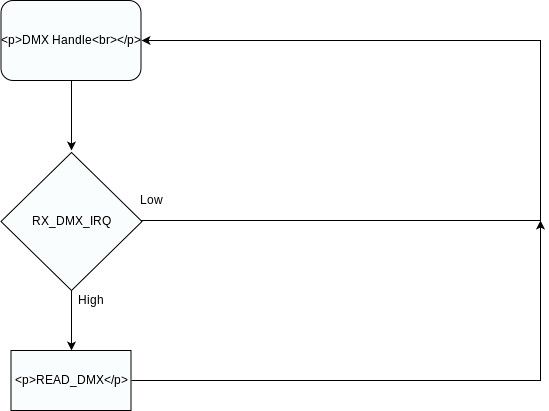
Handling a software update is done through READ_DFU and WRITE_DFU function.The following Interupt lines must be used to derive the state:
- DFU_START_IRQ
- DFU_PACKET_IRQ
- DFU_STOP_IRQ
Whenever a software update is triggered, the DFU_START_IRQ goes high.Then the fixture must get ready for receiving firmware. One of the following responses of the Fixture is required:
- 0x0: DFU_ACCEPT
- 0x1 – 0xFF: DFU_ABORT
A fixture responds by using WRITE_DFU function. The Timeout for the response is set to 20 seconds. Writing a response will disable the DFU_START_IRQ flag. After accepting the DFU, the iQ.Controller starts to send firmware packets. Each packet has a unique id which is counted upwards. Length is variable up to 200Byte. Default length is 128 Byte. packetNr is stored in Big Endian not Little Endian! (Legacy Mode)
| data[0] | data[1] | data[2] | data[2] | … | data[202] |
|---|---|---|---|---|---|
| packetNr | packetNr | data[0] | dmx[1] | … | dmx[200] |
After reading the packet, the next packet will be transfered automatically. No extra response necessary. If there occurs an error it is possible to abort the DFU early by writing a response greater than 0 (0x1 – 0xFF).DFU is aborted if no packet is read for 30 seconds.After receiving the last packet, DFU_STOP_IRQ flag will go high in order to signal that all packets are transfered and DFU transmission is finished.Now a last response from the fixture is required. The response should be one of the following:
- 0x0: DFU_SUCCESS
- 0x1: DFU_ERROR_FLASH_ERASE
- 0x2: DFU_ERROR_NOT_IN_PROGRESS
- 0x3: DFU_ERROR_CORRUPTED_HEADER
- 0x4: DFU_ERROR_CORRUPTED_IMAGE
- 0x5: DFU_ERROR_INVALID_IMAGE_VERSION
- 0x6: DFU_ERROR_NO_PREAMBLE
- 0x7: DFU_ERROR_INVALID_FIXTURE_ID
- 0x8: DFU_ERROR_UNKNOWN
- 0x9: DFU_ERROR_SIGNATURE_NECESSARY_NOT_FOUND
- 0x0A: DFU_ERROR_PACKET_TIMEOUT
- 0x0B – 0xFF: Reserved